Tracta Beta is here
Twelve months of building, rebuilt and refined over twelve weeks of beta feedback: the viewer, comments, transmittals, file support and more, all with a cleaner, more consistent interface throughout.
A new viewer
Rebuilt from the ground up: sharper rendering, continuous-page scrolling, and a cleaner, more consistent chrome throughout. Compare any two revisions side by side, with changes highlighted and superseded pages clearly stamped.
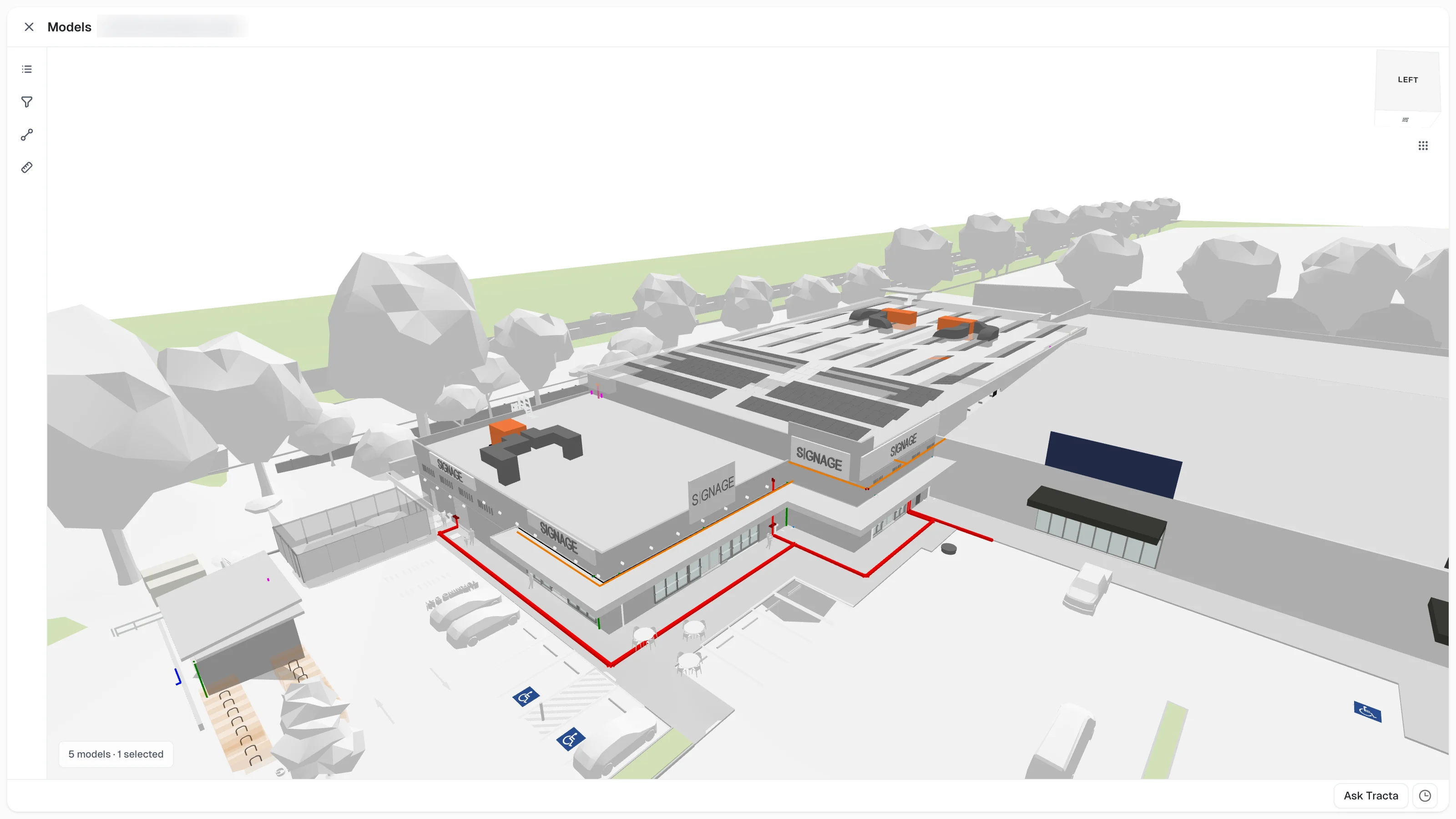
Native 3D model support
Browse full IFC models and DWG revisions without leaving the platform.
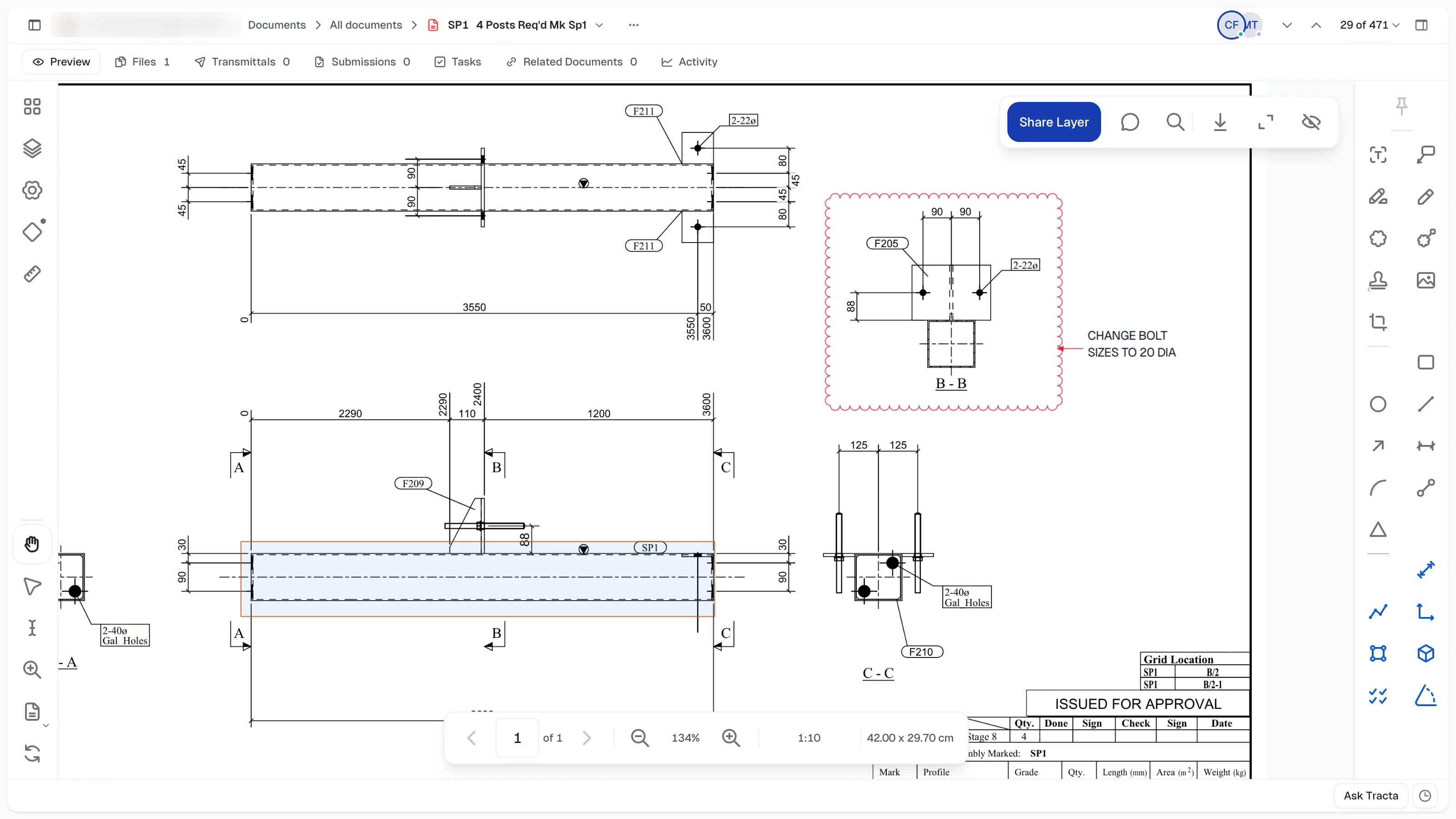
Full markup and measurements
A complete markup toolset — callouts, clouds, highlights, stamps, dimensions, polylines and snapshots — plus calibrated measurements for length, area, perimeter, volume, count and angle. Organise it all on named layers, shared with the team or kept private, with snapping, live collaboration and export to a marked-up PDF.
Comments, reimagined
Slack-style threads, @-mentions, and pins that live directly on the drawing — tied to the revision they were made on.
Tasks, rebuilt
A real register: group by status, priority or assignee, create a task for any project without leaving where you are, and see which project each one belongs to at a glance.
A new Home
Project info, documents and people in one continuous page instead of three separate tabs — everything you need on arrival, without the extra clicks.
Set a password
You can now set a password on your Tracta account and use it to sign in. Learn how
iPad and iPhone support and optimisation now available
Tracta is now built for touch on iPad and iPhone. On iPad, viewer panels slide over the page, markups work by finger or Apple Pencil with a toolbar and finish bar, Zoom to region and Snapshot work by dragging, and installed as a home-screen app, Tracta fills the screen. On iPhone there’s a phone layout with its own menu, quick view and multi-select.
Improvements45
- Comments redesigned: grouped threads, @-mentions, per-person avatars, and a Show Resolved switch
- Comments now pin directly onto drawings — panel-to-viewer linking, revision ghosting, a Layers toggle
- Markup is fully server-backed with live collaboration — teammates’ edits appear and highlight as they happen
- Layers for markup: create named layers, mark them Shared or Private, show or hide them, and delete a layer with or without its markups
- Calibrate any drawing’s scale once, or pick a preset, and every measurement follows — Length, Polylength, Area, Perimeter, Volume, Count and Angle
- A Measure drawer lists every measurement on the sheet in one place
- Snapping to drawing geometry for precise markup and measurement
- Stamps, Cloud+, Arc, Polygon and Image markup tools, with a properties strip for colour, line style and endpoints
- Snapshot: drag a region of one sheet and paste it onto any other
- Export a marked-up PDF with your markups embedded
- Compare any two revisions side by side, with additions and removals colour-coded
- Transmittals and chat now share one unified panel system, with a rebuilt composer
- One-click acknowledgement, honest recipient pills, viewed-activity tracking
- Group transmittals: build a People package, then search for it as a recipient to send to everyone in it at once
- Native IFC model viewing — load every model in a project at once
- DWG viewer for revision files, plus auto-linked DWG rows that save alongside their PDF
- Pending Review shows the linked revision the server actually stored
- Confident-match auto-linking connects uploads to the right revision automatically
- Tasks reworked to match the Documents-page pattern, with a new Status indicator and assignee column
- Create a task for any project without leaving the one you’re in, and see which project each task belongs to
- Group tasks by status, priority or assignee; filter by how much completed work shows
- Grouping added across Pending Review, Documents, Latest Upload, Transmittals and Packages
- A cleaner, more consistent interface throughout, easier to scan and navigate
- Home page rebuilt: project info, documents and people as one page instead of three separate tabs
- Breadcrumb navigation on every register: Project › Register › view, always visible, so you always know where you are
- A quick view switcher sits right next to it, in the same header row
- Sidebar redesigned: collapsible shell with persisted state, a colour picker for custom appearance, reworked Favourites
- A command palette for the whole app — jump to any page, create a record, or search, all from one box
- A quick-create menu for starting a new record from anywhere
- New Details panel alongside registers
- Hover cards on contact names and document avatars — see who’s who, open the full audience view
- A new typeface throughout: Geist Sans replaces Inter, including in exported PDFs
- Tooltips unified app-wide, with keyboard-shortcut hints
- A single, sharper focus ring on every control, in place of the old soft glow
- One consistent style for modals, dialogs, filters and view pickers
- Lookup fields like Discipline and Status redesigned as colour chips
- Sign-in and sign-up flow refreshed: cleaner layout, clearer progress
- Every avatar is circular now, with a refined presence dot
- Archive and restore documents from the detail page
- Filter builder gets And/Or conditions
- See who’s online, and who’s viewing a revision, at a glance
- More reliable sign-in sessions across devices
- New read-only roles: Member and External Member
- Sort button in the Models drawer
- Sidebar switcher reordered: project before workspace
Fixes5
- Fixed markup flicker on Callout, Cloud+, Dimension and measurement labels
- Fixed centring after resize; the thumbnail rail now focuses the current page immediately
- Sent documents open at the exact revision that was sent
- Replacing a file now shows as a replace, with a record of what changed
- Clearer deactivation status on contacts
Keyboard shortcuts5
- ⌘K / Ctrl+K to open the command palette — jump to a page, create a record, or search
- Copy link (⌘L / Ctrl+L) from any record, register or Home menu
- Spreadsheet-style Tab navigation in every register table and Pending Review
- Ctrl+F find bar to filter the current register
- J / K to step between records